
If you're tracking clients across notebooks, WhatsApp threads, and spreadsheets, you already know it doesn't scale. Here's how personal trainers use Notion as a client tracking tool to manage every client in one place, without monthly fees.
What a Personal Trainer Client Tracker Should Do
What a Personal Trainer Client Tracker Should Do
Most trainers start out keeping track of clients in their head, in a notebook, or across a jumble of spreadsheets and WhatsApp threads. It works for two or three clients. It completely falls apart at ten.
A good client fitness tracking system isn't just about being organised. It's about being a better coach. When you can pull up exactly what a client lifted last week, what their body weight has done over the past month, and what they said in their last check-in — all in under ten seconds — you coach differently. You catch plateaus earlier. You give better feedback. You spot the pattern between a client's sleep logs and their performance dips.
PRO COACH is built to give personal trainers and online coaches that kind of visibility across every client, without needing to pay monthly for separate fitness client tracking software.
Most trainers start out keeping track of clients in their head, in a notebook, or across a jumble of spreadsheets and WhatsApp threads. It works for two or three clients. It completely falls apart at ten.
A good client fitness tracking system isn't just about being organised. It's about being a better coach. When you can pull up exactly what a client lifted last week, what their body weight has done over the past month, and what they said in their last check-in — all in under ten seconds — you coach differently. You catch plateaus earlier. You give better feedback. You spot the pattern between a client's sleep logs and their performance dips.
PRO COACH is built to give personal trainers and online coaches that kind of visibility across every client, without needing to pay monthly for separate fitness client tracking software.
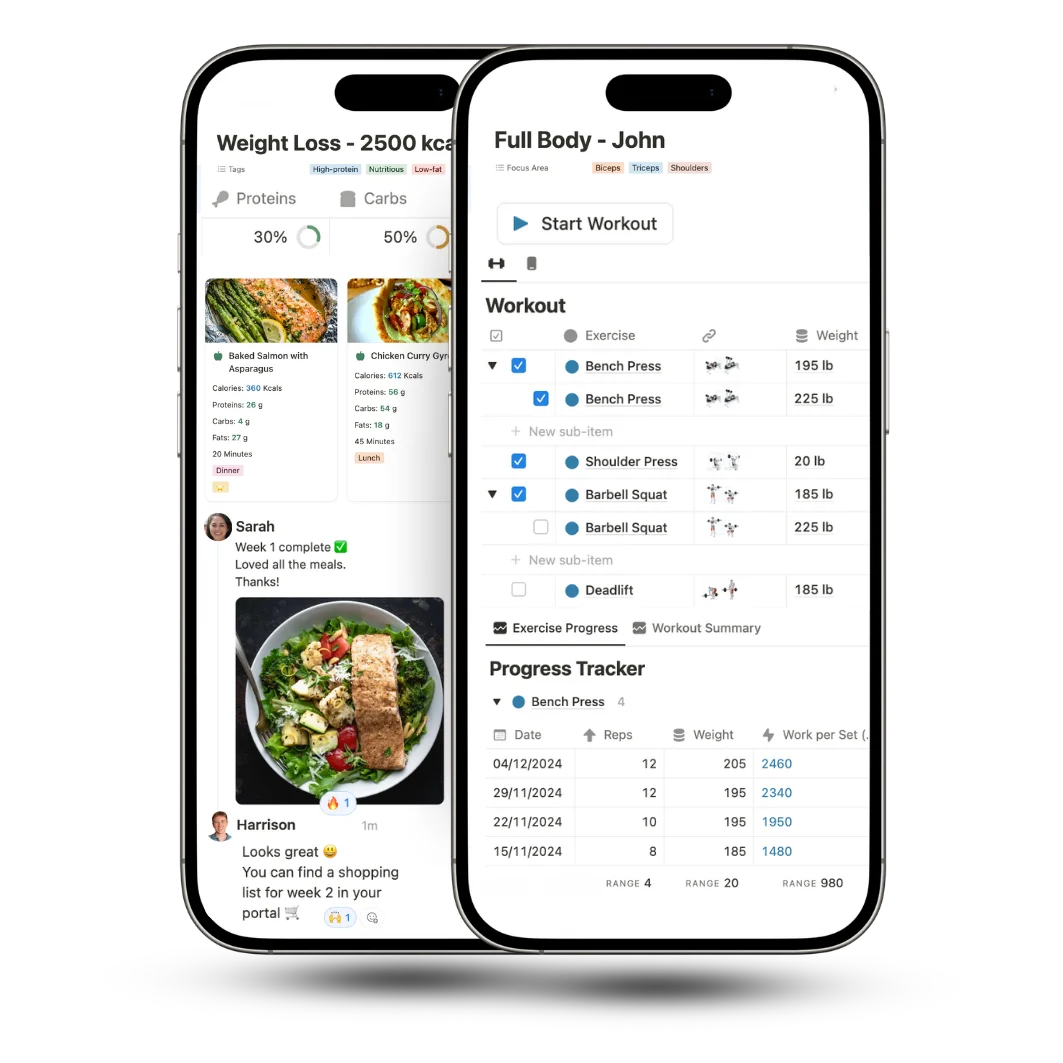
How to Manage Coaching Clients in Notion
How to Manage Coaching Clients in Notion
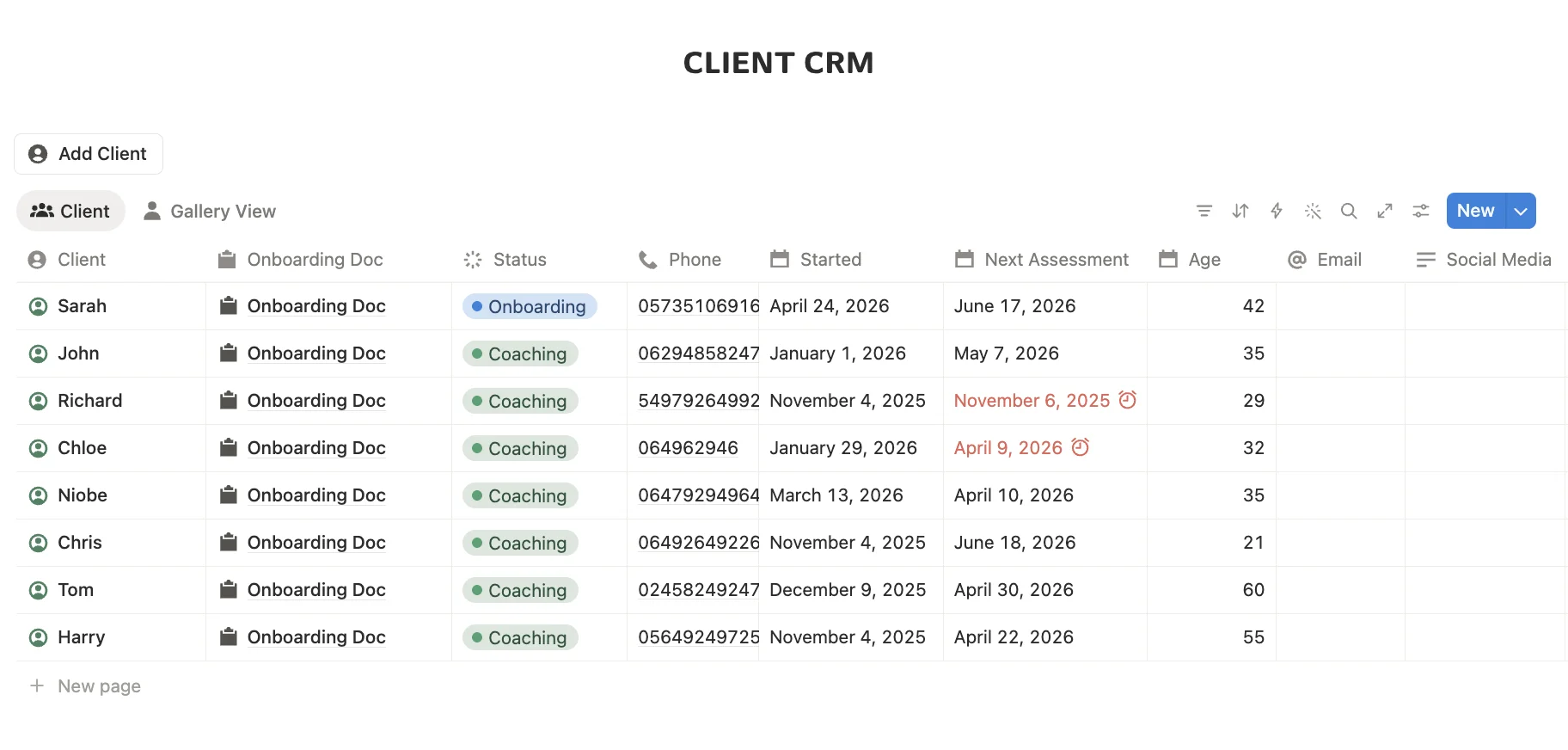
A good client management system for personal trainers should keep contact information, goals, progress, programs, notes and check-ins connected in one place.
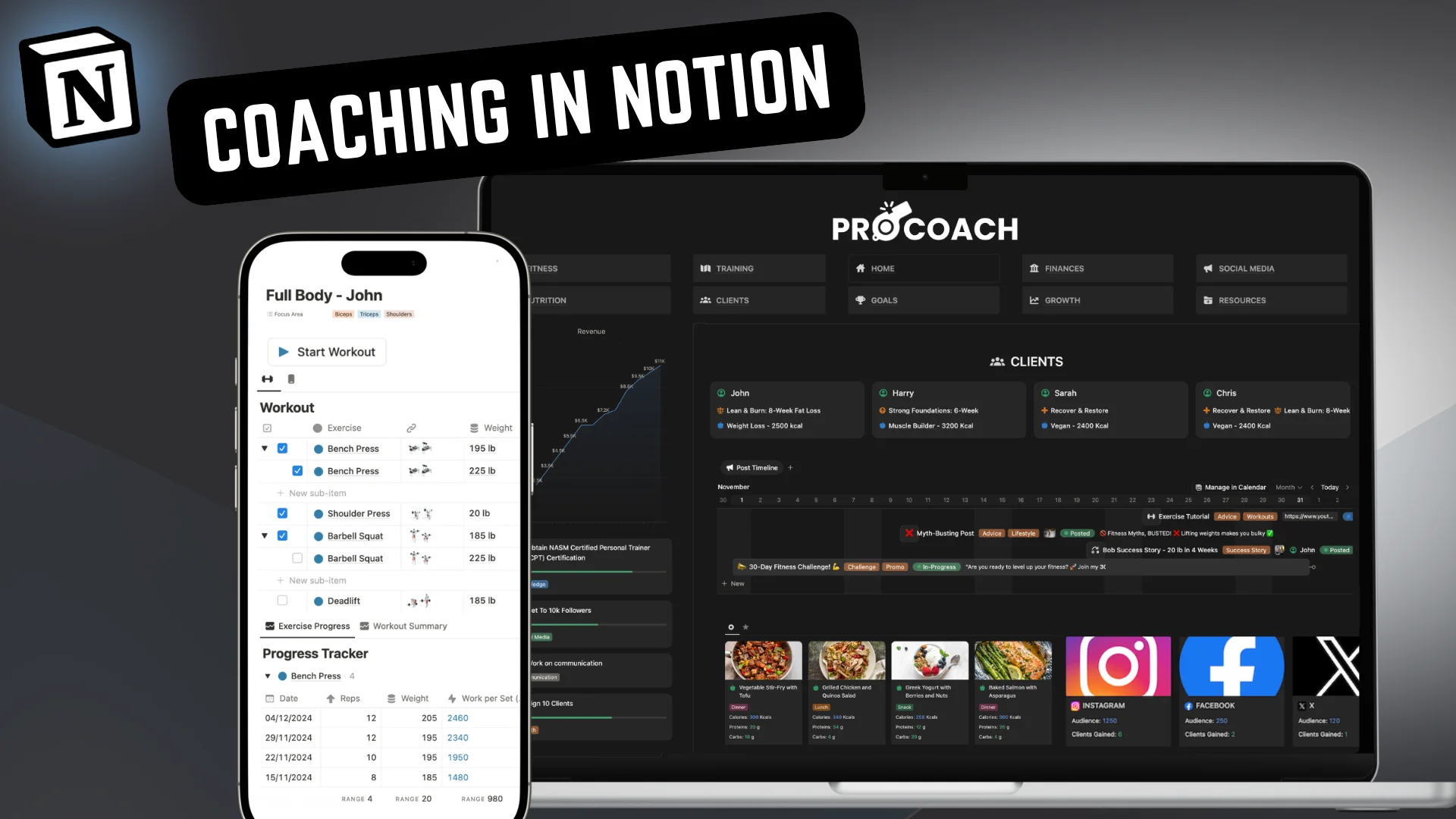
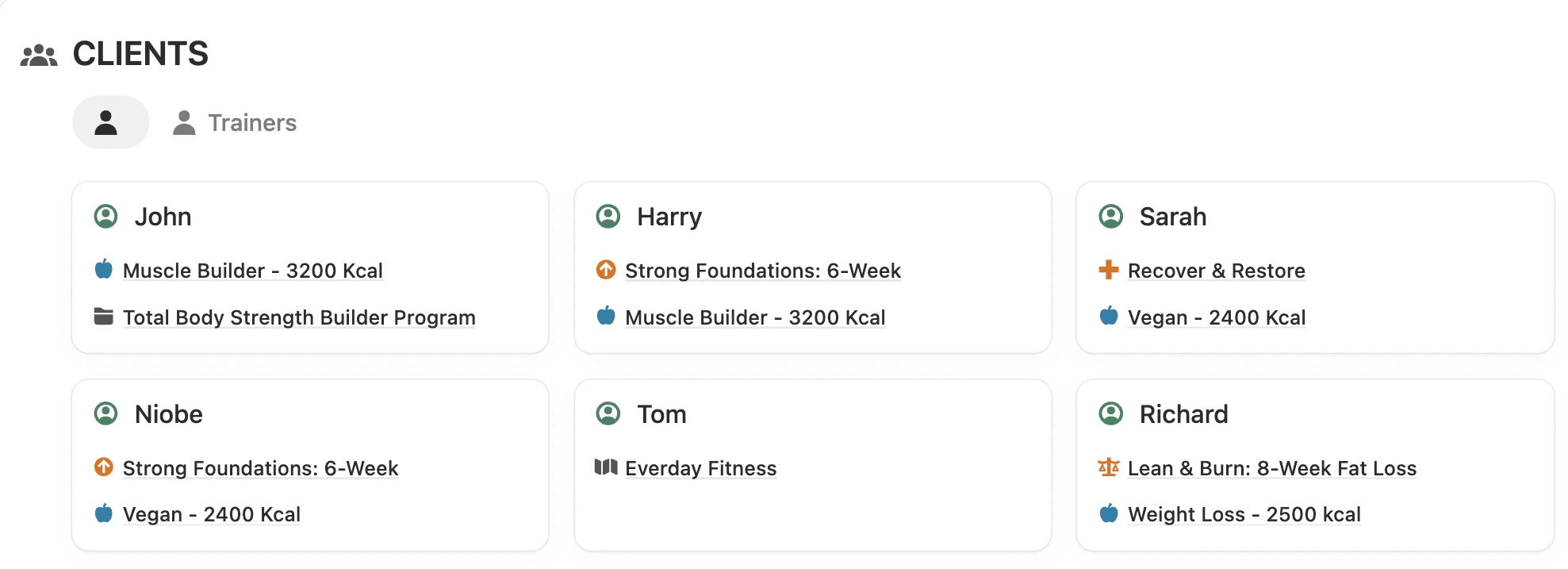
One of the main benefits of PRO COACH is that it has an integrated CRM for your personal training client. It combines many of the core features you'd expect from fitness coaching CRM software, including client records, lead tracking, follow-ups, assessments and coaching information.
Every client gets their own dedicated portal page. Inside that page you store everything: contact details, health history, goals, assessment notes, emergency contacts, and any other information worth remembering. It's all searchable, all in one place, and it never gets buried in an email chain.
For online coaches managing 15, 20, or 30 clients at once, this changes how you operate day to day. You're not starting every client interaction by trying to remember where you put their intake form. You open their page and everything is right there.
A good client management system for personal trainers should keep contact information, goals, progress, programs, notes and check-ins connected in one place.
One of the main benefits of PRO COACH is that it has an integrated CRM for your personal training client. It combines many of the core features you'd expect from fitness coaching CRM software, including client records, lead tracking, follow-ups, assessments and coaching information.
Every client gets their own dedicated portal page. Inside that page you store everything: contact details, health history, goals, assessment notes, emergency contacts, and any other information worth remembering. It's all searchable, all in one place, and it never gets buried in an email chain.
For online coaches managing 15, 20, or 30 clients at once, this changes how you operate day to day. You're not starting every client interaction by trying to remember where you put their intake form. You open their page and everything is right there.
"Excellent for keeping track of my business. What I like the most is that you pay once and that's it! No subscriptions."
Nicolas
"Excellent for keeping track of my business. What I like the most is that you pay once and that's it! No subscriptions."
Nicolas
"Excellent for keeping track of my business. What I like the most is that you pay once and that's it! No subscriptions."
Nicolas
Complete Client Management, From Lead to Success
Manage every stage of your client journey in one connected system. PRO COACH brings client acquisition, onboarding, coaching, progress tracking and client success together, giving personal trainers a complete client management setup without scattered apps or spreadsheets.
Acquisition
Onboarding
Coaching
Success


Acquisition
Turn More Leads Into Clients
Use the dedicated lead tracker to record where new leads come from, capture notes and questions, schedule follow-ups and keep every opportunity organised. When a lead is ready to start, turn them into a client in one click and move them straight into your client management system.
Acquisition
Onboarding
Coaching
Success
Acquisition
Turn More Leads Into Clients
Use the dedicated lead tracker to record where new leads come from, capture notes and questions, schedule follow-ups and keep every opportunity organised. When a lead is ready to start, turn them into a client in one click and move them straight into your client management system.
Acquisition
Turn More Leads Into Clients
Use the dedicated lead tracker to record where new leads come from, capture notes and questions, schedule follow-ups and keep every opportunity organised. When a lead is ready to start, turn them into a client in one click and move them straight into your client management system.

Onboarding
Assess & Onboard Every Client
Streamline client onboarding with assessments, questionnaires, goals, measurements and important client information stored together, giving you everything needed to start coaching with confidence.

Coaching
Manage Coaching in One Portal
Create dedicated client portals where personal training clients can access workouts, training plans, nutrition, check-ins and progress tracking, while you manage their coaching from one central place.


Success
Track Results & Client Success
Monitor client progress, goals and results over time, then capture testimonials and success stories you can use to demonstrate results, strengthen retention and help attract new clients.
Client Progress Tracking Across Every Area of Health & Fitness
Client Progress Tracking Across Every Area of Health & Fitness
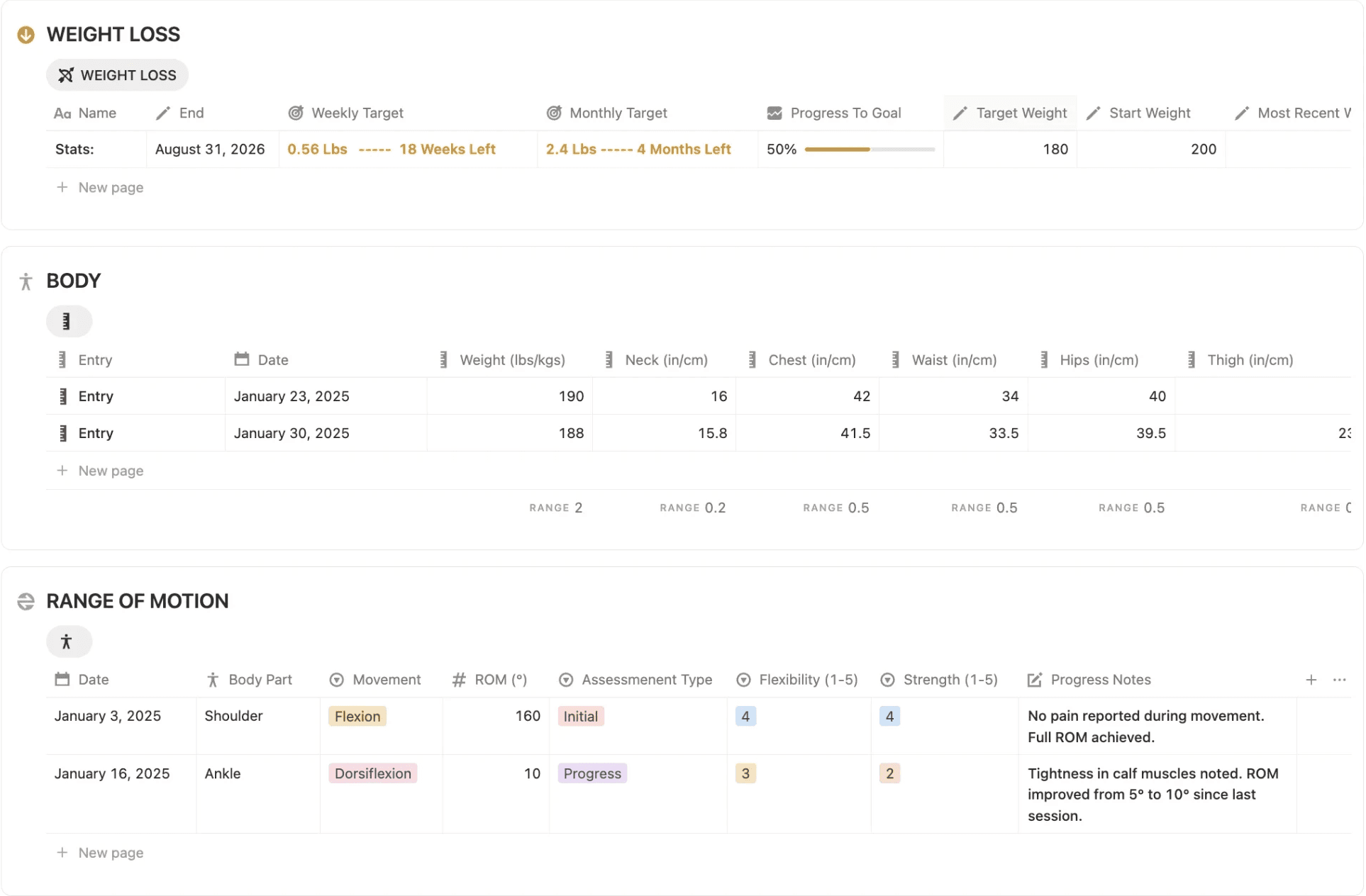
Client progress tracking looks different for every goal, so PRO COACH lets you choose the trackers that matter for each client and build their portal around their specific needs.
For fitness tracking, you can log workouts, session by session, track strength progression, volume, personal bests, and 1RM across exercises, and keep a full training log over time. For clients focused on body composition, you can track weight, measurements, body photos, and ROM. Nutrition tracking covers macro targets, meal logs, and shopping lists. And for the bigger picture of a client's health, there are habit trackers, recovery logs, check-in journals, and lifestyle notes.
Together, these create a complete client health tracker covering training, body composition, nutrition, recovery and lifestyle.
In practice this means a fat loss client has a very different looking portal to a strength athlete, and both look different to a general fitness client who just wants to feel better. That level of personalisation is what makes clients feel like they're getting a premium service rather than a one-size-fits-all program.
Client progress tracking looks different for every goal, so PRO COACH lets you choose the trackers that matter for each client and build their portal around their specific needs.
For fitness tracking, you can log workouts, session by session, track strength progression, volume, personal bests, and 1RM across exercises, and keep a full training log over time. For clients focused on body composition, you can track weight, measurements, body photos, and ROM. Nutrition tracking covers macro targets, meal logs, and shopping lists. And for the bigger picture of a client's health, there are habit trackers, recovery logs, check-in journals, and lifestyle notes.
Together, these create a complete client health tracker covering training, body composition, nutrition, recovery and lifestyle.
In practice this means a fat loss client has a very different looking portal to a strength athlete, and both look different to a general fitness client who just wants to feel better. That level of personalisation is what makes clients feel like they're getting a premium service rather than a one-size-fits-all program.
Client Check-Ins and Session Tracking That Actually Stay Organized
Client Check-Ins and Session Tracking That Actually Stay Organized
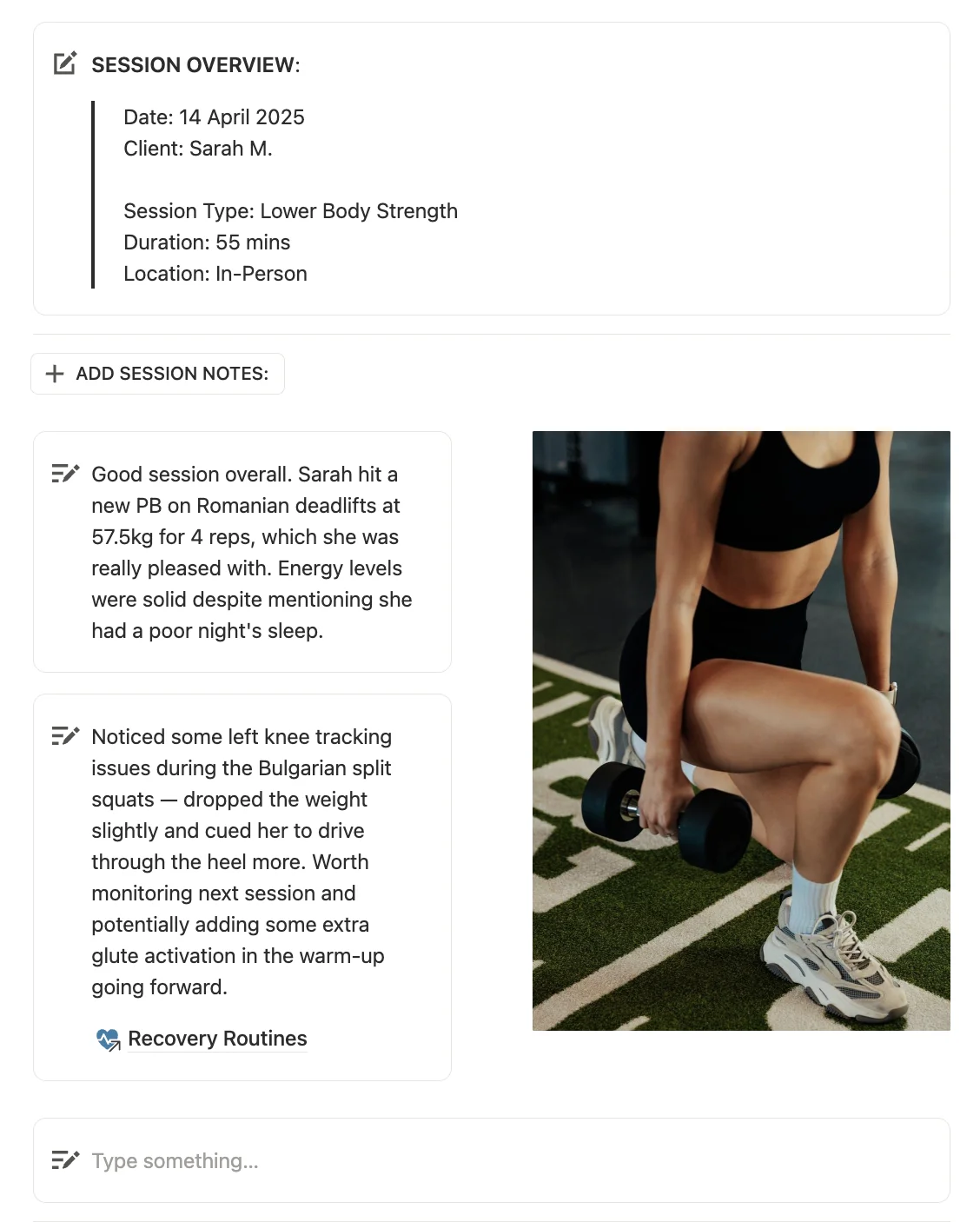
Two things that eat time for almost every coach: writing up session notes and chasing clients for check-ins.
The session tracker in PRO COACH allows you to keep notes stored inside the client's portal alongside their workouts and progress data. You write your notes after a session, and they're attached to that session permanently. Three months later when a client asks "what did we work on when my knee was hurting?", you find it in thirty seconds rather than digging through a notebook.
Check-ins work the same way. Rather than check-in answers sitting in an email inbox or a Google Form that you have to cross-reference manually, they live in the client's page alongside everything else. You can see at a glance how a client responded to last week's training load, what their energy levels were like, and what they want to focus on in the coming week. All of it in context, right where you need it.
Two things that eat time for almost every coach: writing up session notes and chasing clients for check-ins.
The session tracker in PRO COACH allows you to keep notes stored inside the client's portal alongside their workouts and progress data. You write your notes after a session, and they're attached to that session permanently. Three months later when a client asks "what did we work on when my knee was hurting?", you find it in thirty seconds rather than digging through a notebook.
Check-ins work the same way. Rather than check-in answers sitting in an email inbox or a Google Form that you have to cross-reference manually, they live in the client's page alongside everything else. You can see at a glance how a client responded to last week's training load, what their energy levels were like, and what they want to focus on in the coming week. All of it in context, right where you need it.
How to Keep Track of Multiple Personal Training Clients Without Losing Your Mind
How to Keep Track of Multiple Personal Training Clients Without Losing Your Mind
The bigger your client list gets, the more important your systems become. A coach with five clients can get away with a lot. A coach with twenty cannot.
PRO COACH is designed to scale with you. Each new client gets their own portal set up in minutes. There's no limit on how many clients you can add, and because everything lives in one Notion workspace, switching between clients is just clicking between pages. No logging into different accounts, no hunting for files, and no jumping between a separate client tracking app, spreadsheets and other coaching tools.
The dashboard gives you a high-level view across your entire client base so you can see who needs attention, who has upcoming sessions, and who hasn't checked in recently — without having to open every individual client page to find out.
The bigger your client list gets, the more important your systems become. A coach with five clients can get away with a lot. A coach with twenty cannot.
PRO COACH is designed to scale with you. Each new client gets their own portal set up in minutes. There's no limit on how many clients you can add, and because everything lives in one Notion workspace, switching between clients is just clicking between pages. No logging into different accounts, no hunting for files, and no jumping between a separate client tracking app, spreadsheets and other coaching tools.
The dashboard gives you a high-level view across your entire client base so you can see who needs attention, who has upcoming sessions, and who hasn't checked in recently — without having to open every individual client page to find out.
"Extremely well put together, best CRM out there and even has all the extra bonuses. Highly recommend."
Benjamin Morris
"Extremely well put together, best CRM out there and even has all the extra bonuses. Highly recommend."
Benjamin Morris
"Extremely well put together, best CRM out there and even has all the extra bonuses. Highly recommend."
Benjamin Morris
Building Programs for Different Client Goals
Building Programs for Different Client Goals
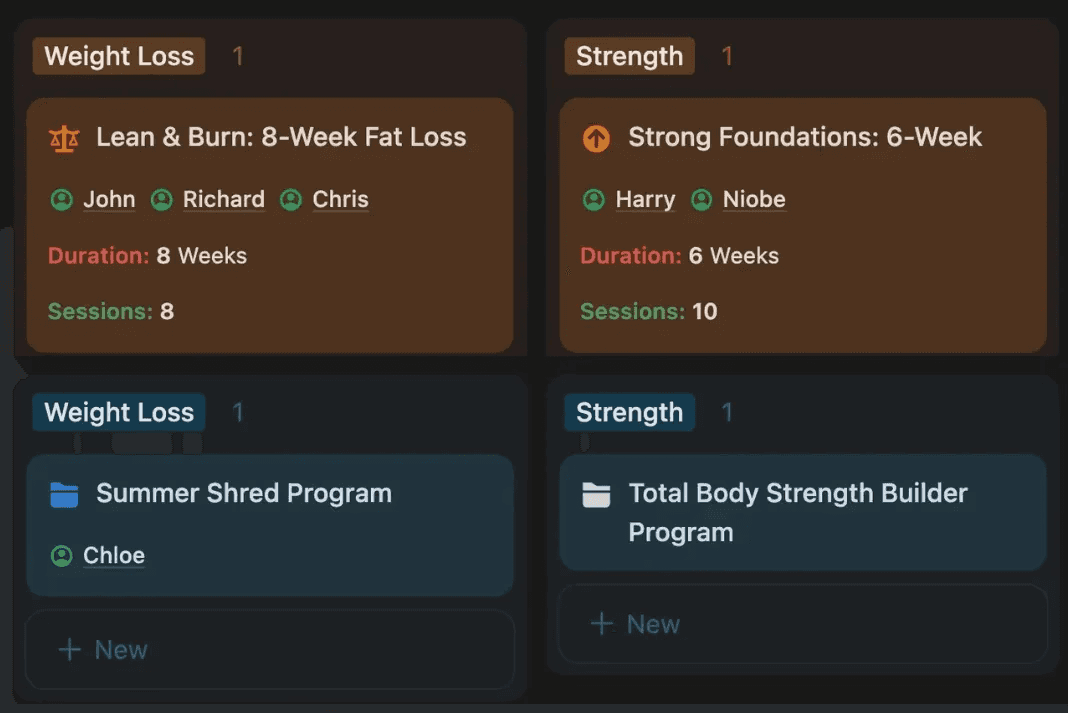
Every client portal also connects directly to their training plan. You can assign programs, update them, and track how clients are progressing through their sessions — all from the same place. If you want to go deeper on how the program building side works, there's a full walkthrough here.
Every client portal also connects directly to their training plan. You can assign programs, update them, and track how clients are progressing through their sessions — all from the same place. If you want to go deeper on how the program building side works, there's a full walkthrough here.
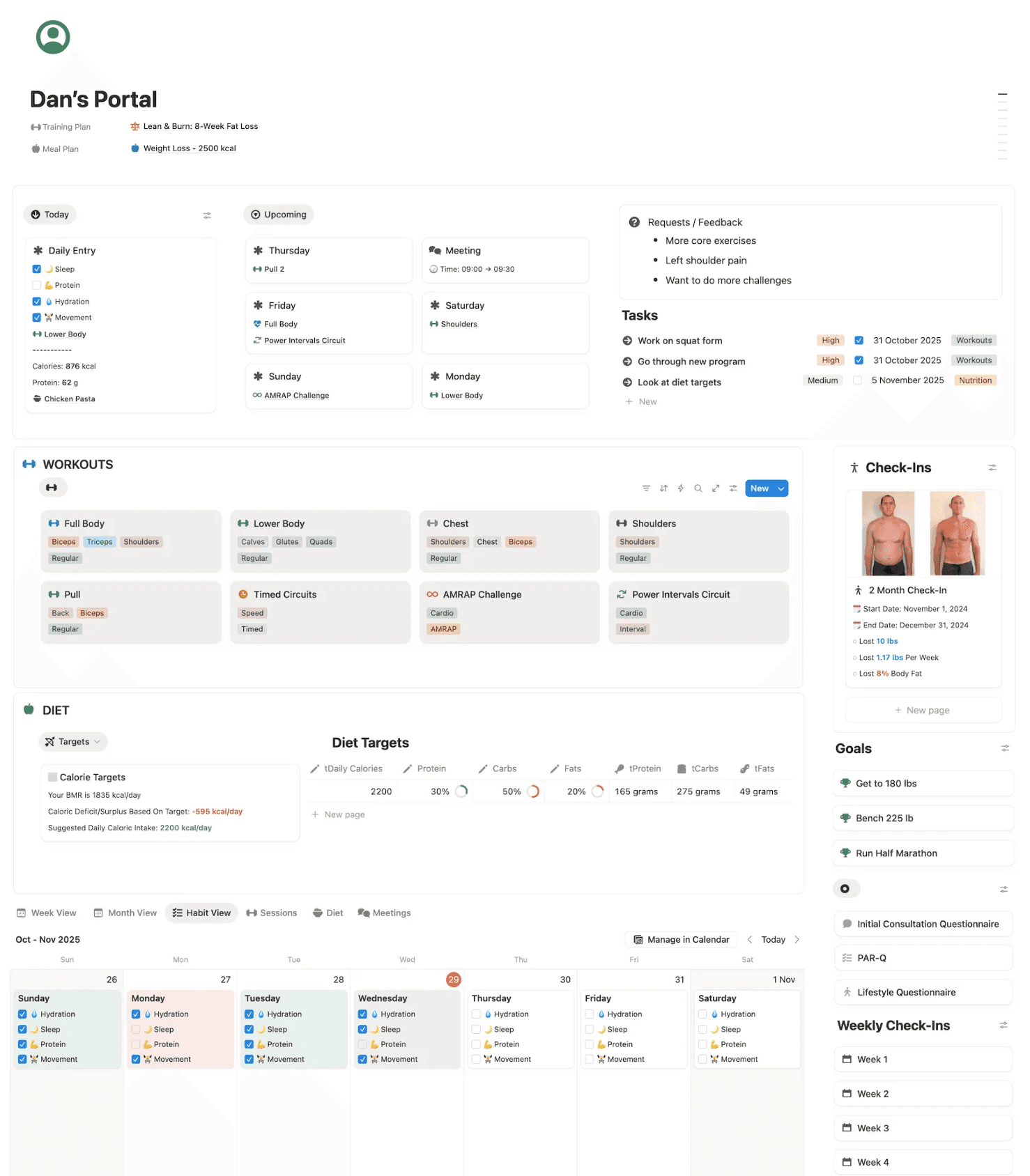
Create client portals to store information, track progress & organize training
Create client portals to store information, track progress & organize training
Track all your personal training clients easily using Notion with a built-in CRM and client dashboards. Store all relevant client workouts, training plans, and meal plans. Track weight, cardio, strength, nutrition & more easily. Set diet targets and record session notes and reminders. Customize these pages to fit your unique coaching style and your client's needs.
Track all your personal training clients easily using Notion with a built-in CRM and client dashboards. Store all relevant client workouts, training plans, and meal plans. Track weight, cardio, strength, nutrition & more easily. Set diet targets and record session notes and reminders. Customize these pages to fit your unique coaching style and your client's needs.
Use client portals to store information, track progress & organize & share training
Track all your personal training clients easily using Notion with a built-in CRM and client dashboards. Store all relevant client workouts, training plans, and meal plans. Track weight, cardio, strength, nutrition & more easily. Set diet targets and record session notes and reminders. Customize these pages to fit your unique coaching style and your client's needs.
CRM
Built-In
Simplify your client management with a built-in personal trainer CRM for clients' contact information, personal details & more. Easily store any information worth remembering.
CRM
Built-In
Simplify your client management with a built-in personal trainer CRM for clients' contact information, personal details & more. Easily store any information worth remembering.
Progress
Tracking Across All Areas
The client pages offer a range of advanced tools to track progress. Use the buttons to add weight, cardio, and diet trackers, to meet their specific goals and objectives.
Progress
Tracking Across All Areas
The client pages offer a range of advanced tools to track progress. Use the buttons to add weight, cardio, and diet trackers, to meet their specific goals and objectives.
Goals
& Tasks Management
Use the onboarding templates to outline client objectives, goals, and concerns. Track progress toward their goals and create a plan for success.
Goals
& Tasks Management
Use the onboarding templates to outline client objectives, goals, and concerns. Track progress toward their goals and create a plan for success.
Sessions
Tracking & Notes
Track personal training sessions, add workouts and record notes to reference or share later.
Session
Tracking & Notes
Track personal training sessions, add workouts and record notes to reference or share later.
"I’ve been using pro coach for my clients and they love it. It really elevates the training experience and simplifies programming! I also appreciate your help with getting started and sharing the client profiles."
Machaela Simmons
"I’ve been using pro coach for my clients and they love it. It really elevates the training experience and simplifies programming! I also appreciate your help with getting started and sharing the client profiles."
Machaela Simmons
"I’ve been using pro coach for my clients and they love it. It really elevates the training experience and simplifies programming! I also appreciate your help with getting started and sharing the client profiles."
Machaela Simmons
The Complete Personal Trainer Client Tracker
The system shown above is part of PRO COACH, a Notion template designed for online fitness coaches and personal trainers.
It includes unlimited client portal, client session tracking, a calendar, check-in system, and coaching dashboard built specifically for fitness businesses. Together, these give you a flexible client tracking and management system for running your coaching business from one place.
The Complete Personal Trainer Client Tracker
The system shown above is part of PRO COACH, a Notion template designed for online fitness coaches and personal trainers.
It includes unlimited client portal, client session tracking, a calendar, check-in system, and coaching dashboard built specifically for fitness businesses. Together, these give you a flexible client tracking and management system for running your coaching business from one place.
The Complete Notion Personal Trainer Template
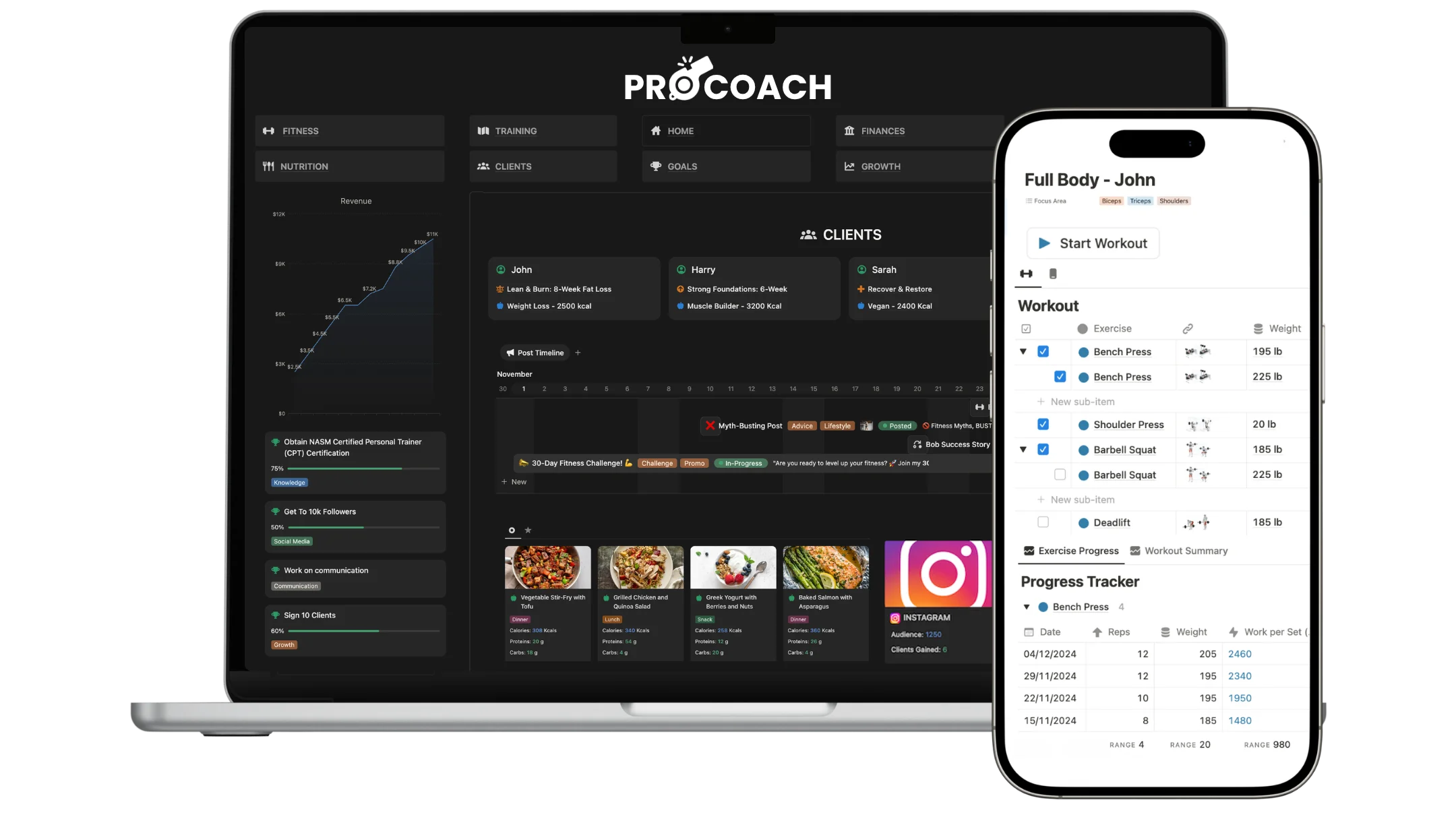
For personal trainers and coaches who want the full setup, PRO COACH is a done-for-you Notion system built to handle every part of your coaching business in one place. It has been downloaded by over 1,500 in-person, online, and hybrid coaches and personal trainers who were done with spreadsheets and did not want to pay ongoing app fees.
It covers client portals, progress tracking, workout and meal plan builders, session management, leads, invoices, and business planning, & more, all connected, all customisable, and all yours for a one-time payment with lifetime updates included.
200+ movements
Business manager
Progress tracking
Fully customizable
Client portals
Diet & fitness coaching
More features
Bonus growth toolkit
Used by 1,700+ coaches
Email support
200+ movements
Business manager
Progress tracking
Fully customizable
Client portals
Diet & fitness coaching
No monthly fees
Bonus growth toolkit
Used by 1,700+ coaches
Email support
200+ movements
Business manager
Progress tracking
Fully customizable
Client portals
Diet & fitness coaching
More features
Bonus growth toolkit
Used by 1,700+ coaches
Email support
Any Area Of Personal Training Client Tracking
Any Area Of Personal Training Client Tracking
PRO COACH includes a range of trackers across any area of your coaching. Each can be added to a client's portal in one click and customized to include any metric or activity. You also have the ability to create custom progress trackers for your clients, so anything worth measuring gets tracked. More data, more control, & more client wins.
Client Workout Tracking
Make it easy for clients to log every session, so you always know what they actually did. With 1-click tracking, clients mark a workout complete in seconds from their client portal, which means fewer missed logs and more accurate data for you. PRO COACH supports 5+ workout types, so strength, conditioning, and other sessions are all tracked in one place. You can also compare session volume across workouts to see whether a client's training load is progressing, holding steady, or dropping off, and adjust their program with confidence.


Client Workout Tracking
Make it easy for clients to log every session, so you always know what they actually did. With 1-click tracking, clients mark a workout complete in seconds from their client portal, which means fewer missed logs and more accurate data for you. PRO COACH supports 5+ workout types, so strength, conditioning, and other sessions are all tracked in one place. You can also compare session volume across workouts to see whether a client's training load is progressing, holding steady, or dropping off, and adjust their program with confidence.
Client Workout Tracking
Make it easy for clients to log every session, so you always know what they actually did. With 1-click tracking, clients mark a workout complete in seconds from their client portal, which means fewer missed logs and more accurate data for you. PRO COACH supports 5+ workout types, so strength, conditioning, and other sessions are all tracked in one place. You can also compare session volume across workouts to see whether a client's training load is progressing, holding steady, or dropping off, and adjust their program with confidence.
Client Diet and Nutrition Tracking
Keep your clients' nutrition on track without chasing them for food diaries. Build meal plans for each client, set their calorie and macro targets, and give them shopping lists so they know exactly what to buy and eat each week. Clients log what they eat in their portal, and you can review their diet against their targets and alongside their training to spot what is helping and what is holding them back.

Client Diet and Nutrition Tracking
Keep your clients' nutrition on track without chasing them for food diaries. Build meal plans for each client, set their calorie and macro targets, and give them shopping lists so they know exactly what to buy and eat each week. Clients log what they eat in their portal, and you can review their diet against their targets and alongside their training to spot what is helping and what is holding them back.
Client Diet and Nutrition Tracking
Keep your clients' nutrition on track without chasing them for food diaries. Build meal plans for each client, set their calorie and macro targets, and give them shopping lists so they know exactly what to buy and eat each week. Clients log what they eat in their portal, and you can review their diet against their targets and alongside their training to spot what is helping and what is holding them back.
Client Habit Tracker
Help clients build the daily habits that drive results. Set the habits each client should hit, such as water intake, sleep, or daily steps, and they check them off right in their client portal. You can see at a glance who is staying consistent and who needs a check-in before progress stalls.

Client Habit Tracker
Help clients build the daily habits that drive results. Set the habits each client should hit, such as water intake, sleep, or daily steps, and they check them off right in their client portal. You can see at a glance who is staying consistent and who needs a check-in before progress stalls.
Client Habit Tracker
Help clients build the daily habits that drive results. Set the habits each client should hit, such as water intake, sleep, or daily steps, and they check them off right in their client portal. You can see at a glance who is staying consistent and who needs a check-in before progress stalls.
Client Strength Progress Tracking
Track every lift so you can program progressive overload with confidence. Clients record their sets, reps, and weights, and you get a clear history of how their strength is progressing on each exercise, including new personal records.

Client Strength Progress Tracking
Track every lift so you can program progressive overload with confidence. Clients record their sets, reps, and weights, and you get a clear history of how their strength is progressing on each exercise, including new personal records.
Client Strength Progress Tracking
Track every lift so you can program progressive overload with confidence. Clients record their sets, reps, and weights, and you get a clear history of how their strength is progressing on each exercise, including new personal records.
Client Weight Tracking
Whether your client is cutting or building, weight tracking keeps their goal front and center. Clients log their bodyweight from their portal, and you can follow the trend over time to see if they are moving toward their target and adjust their plan when they are not.

Client Weight Tracking
Whether your client is cutting or building, weight tracking keeps their goal front and center. Clients log their bodyweight from their portal, and you can follow the trend over time to see if they are moving toward their target and adjust their plan when they are not.
Client Weight Tracking
Whether your client is cutting or building, weight tracking keeps their goal front and center. Clients log their bodyweight from their portal, and you can follow the trend over time to see if they are moving toward their target and adjust their plan when they are not.
Client Body Tracking
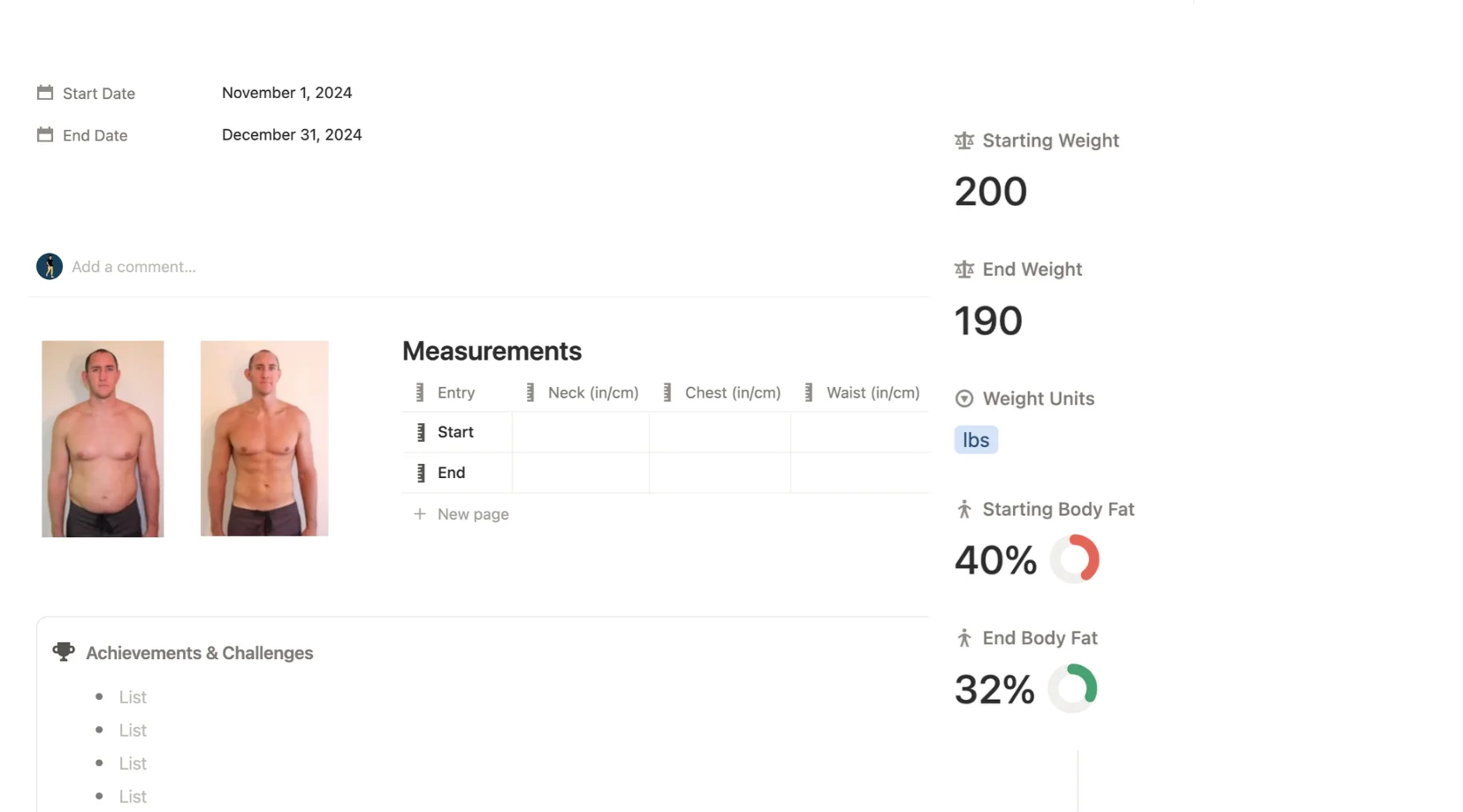
The scale never tells the full story. Track body measurements such as waist, chest, hips, and arms so clients can see changes in their shape even when their weight stays the same. It is one of the best ways to keep clients motivated through a plateau.
Client Body Tracking
The scale never tells the full story. Track body measurements such as waist, chest, hips, and arms so clients can see changes in their shape even when their weight stays the same. It is one of the best ways to keep clients motivated through a plateau.
Client Body Tracking
The scale never tells the full story. Track body measurements such as waist, chest, hips, and arms so clients can see changes in their shape even when their weight stays the same. It is one of the best ways to keep clients motivated through a plateau.
Client Range of Motion (ROM) and Mobility Tracking
Measure and record your clients' range of motion so you can track mobility improvements over time. ROM tracking is ideal for coaches working with clients on flexibility, injury recovery, or movement quality, giving you a clear record of where they started and how far they have come.

Client Range of Motion (ROM) and Mobility Tracking
Measure and record your clients' range of motion so you can track mobility improvements over time. ROM tracking is ideal for coaches working with clients on flexibility, injury recovery, or movement quality, giving you a clear record of where they started and how far they have come.
Client Range of Motion (ROM) and Mobility Tracking
Measure and record your clients' range of motion so you can track mobility improvements over time. ROM tracking is ideal for coaches working with clients on flexibility, injury recovery, or movement quality, giving you a clear record of where they started and how far they have come.

Cardio Tracking for Coaching Clients
Log runs, rides, rows, and every other cardio session in one place. Clients record their cardio in their portal, so you can monitor their conditioning work alongside their strength training and make sure their overall training load is balanced.

Cardio Tracking for Coaching Clients
Log runs, rides, rows, and every other cardio session in one place. Clients record their cardio in their portal, so you can monitor their conditioning work alongside their strength training and make sure their overall training load is balanced.
Cardio Tracking for Coaching Clients
Log runs, rides, rows, and every other cardio session in one place. Clients record their cardio in their portal, so you can monitor their conditioning work alongside their strength training and make sure their overall training load is balanced.
Custom Client Tracking for Any Metric
Every client is different, so PRO COACH lets you build your own trackers for anything the built-in options do not cover. Track sport-specific performance, recovery scores, or any metric that matters to your coaching, all inside the same client portal.

Custom Client Tracking for Any Metric
Every client is different, so PRO COACH lets you build your own trackers for anything the built-in options do not cover. Track sport-specific performance, recovery scores, or any metric that matters to your coaching, all inside the same client portal.
Custom Client Tracking for Any Metric
Every client is different, so PRO COACH lets you build your own trackers for anything the built-in options do not cover. Track sport-specific performance, recovery scores, or any metric that matters to your coaching, all inside the same client portal.
Frequently Asked Questions
Can I track multiple personal training clients at once?
Yes, there's no limit on the number of clients you can add. Each client gets their own dedicated portal page inside your Notion workspace. You can also set up team or group pages for group coaching. Switching between clients is just clicking between pages with no separate logins needed.
Do my clients need a Notion account to access their portal?
It depends on how you share with them. You can share a client's portal page via a public link, in which case they can view it in any browser without a Notion account. Alternatively you can invite them as a guest via their email, which gives them either view-only or edit access and does require a free Notion account. Most coaches use the public link method for simplicity.
Can clients log their own workouts and progress?
Yes, if you give them edit access to their page they can log sessions, record weights, tick off workouts, track habits, and leave notes. If you share via a public link they can view their program but won't be able to make edits. You choose which level of access suits your coaching style.
What types of progress can I track for each client?
You can track across every area of a client's health. Fitness metrics including strength progression, volume, personal bests, 1RM, cardio, and training logs. Body metrics like weight, measurements, photos, body composition, and ROM. Nutrition including macro targets, meal plans, meal logs, and shopping lists. And lifestyle data including habits, check-ins, journals, and recovery logs. You can also run client assessments with start and end dates, body fat changes, muscle mass changes, and progress photos at different milestones.
Is there a personal trainer CRM built in?
Yes. Each client portal stores contact details, health history, goals, assessment notes, emergency contacts, and any other information worth keeping. You can also track leads separately, log communication history, update lead status, and monitor last contact dates to make sure you're following up consistently.
Can I use this for both in-person and online clients?
Yes. The system works for in-person trainers, online coaches, and hybrid setups. Online clients access their portal remotely via a shared link or email invite. In-person clients can use it to review their sessions and track progress between appointments. There is also a mobile-optimised view and you can add a Notion shortcut widget to your phone's home screen for quick access on the go.
What happens to my client data if I stop using Notion?
Because everything lives in your own Notion workspace, you own the data entirely. You can export it at any time. Unlike subscription client management software & apps where your data is tied to the platform, PRO COACH gives you full control.
Notion PRO COACH Walkthroughs
Notion PRO COACH Walkthroughs