


How to Manage and Grow Your Personal Training Business with Notion
How to Manage and Grow Your Personal Training Business with Notion
personal-training

Running and growing a personal training business, online or in person, can be tough. You're not only finding clients, you're also making sure they're happy and getting results, usually on your own.
With so many moving parts, it helps to have one system where you can manage and track every area of your business.
Below, I'll explain how to manage and grow your personal training business using Notion, an app with a free plan that you can use to organize just about anything.
The three areas of a personal training business
Personal training is made up of three main areas: clients, coaching, and business. Each one needs a different skill set, but that doesn't mean you have to manage them separately.
This guide covers the business side: growing your client base and keeping the clients you have.
If you're like me, you find it useful to have a concrete plan for your business. You know what to do, what works, and which areas need improvement, just like with coaching.
To get there, you need:
A system to acquire leads (potential clients)
A way to track leads so you convert more of them
An onboarding process so you know exactly what each client wants
A way to set targets and track your business results
That's where Notion comes in. This guide walks you through each area and how to manage it in Notion.
Step 1: Acquire more leads
Getting new clients is a different skill from coaching, and it's not what you spent all that time training for. If your business relies on new clients, it's worth having a system that makes lead generation as easy as possible.
Plan your social media content
Depending on the age of your target clients, platforms like Instagram and Facebook are where you'll find many of the clients who don't come from word of mouth or referrals.
Posting content regularly is one of the habits worth getting good at if you want new clients from social media. A social media planning dashboard makes it much easier. You can organize your images and videos, plan when to post, and track the engagement on each post.
Over time, you'll see what resonates with your target clients. Then you can double down on what works and try new ideas where it doesn't.
There's a real science to creating content that not only resonates but also gets people to DM you or buy your package. Tracking your posts is how you figure it out.
In Notion, you can set this up as a content database with a timeline view, so you can schedule posts and keep a consistent posting frequency.
A simple setup looks like this:
Properties: post title, platform, format (reel, carousel, story), post date, status (idea, drafting, scheduled, posted), and number properties for views, comments and DMs
Views: a timeline or calendar view to plan your schedule, and a table sorted by engagement so your best posts rise to the top

Build a recognizable brand
On social media, it pays to have your own brand or vibe. In Notion, you can keep your brand colors, phrases, images, logos, and more in one place, so every post looks like yours. When someone sees your post on the Explore page, they'll know it's you.
A clear brand also helps you niche down, so you can speak directly to the clients you want to work with.

Track growth strategies beyond social media


Social media isn't the only way to grow your business. In Notion, you can lay out different growth strategies, track which ones work, and adjust as you go.
For example, you could create a database to track a client referral program. You'll see which clients have referred new clients, so you can thank or reward them and see how much of your growth comes from referrals.
To set it up, create a referrals database with properties for the new client, who referred them (a relation to your client database), the date, and a checkbox for whether you've sent a thank-you or reward.
Plan and track your outreach messages
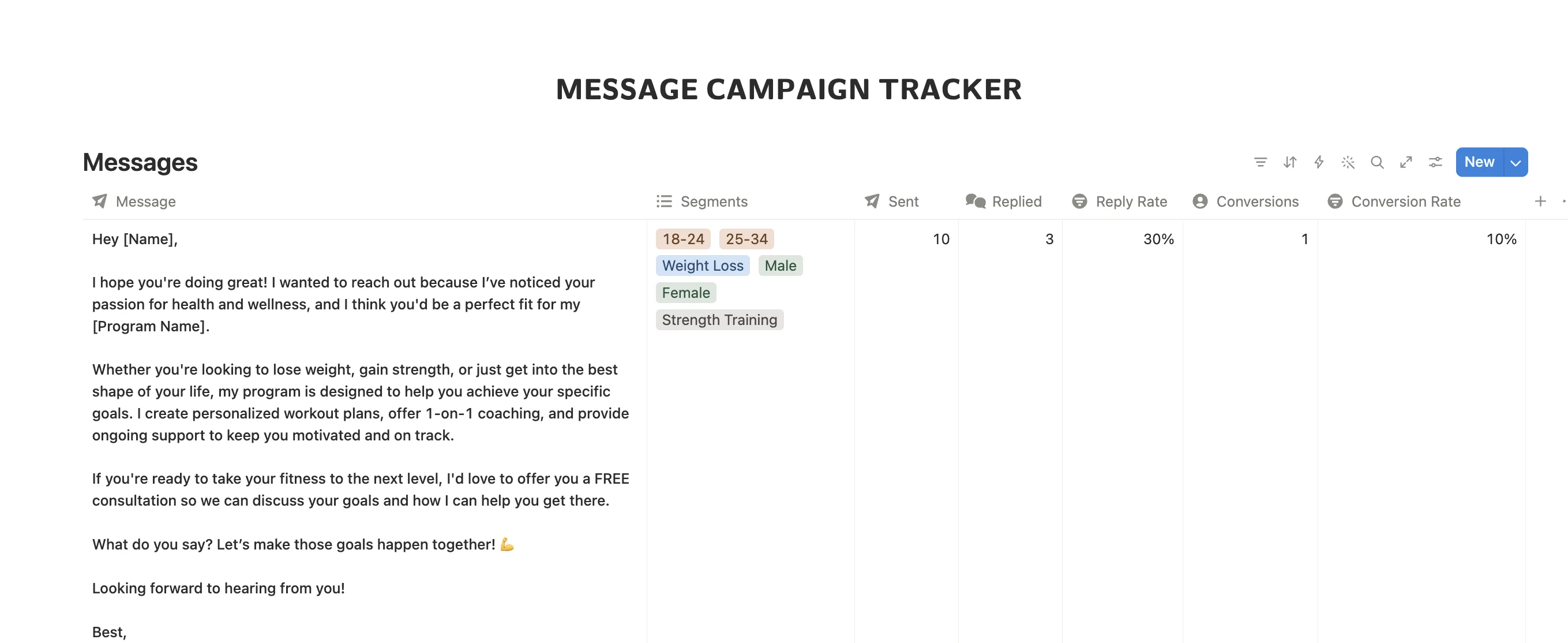
Like your social posts, tracking the DMs and messages you send to potential clients shows you what works. Once you know which opening line gets the most replies, or which call to action converts best, you can tailor your messaging to turn more leads into clients.
In Notion, create a database of your message templates. Give each one properties for the opening line, the call to action, how many times you've sent it, and how many replies it got. A formula property can then calculate the reply rate, so you can see at a glance which messages to keep using.
Use the value equation in your marketing
One marketing idea I love is Alex Hormozi's value equation, from his book $100M Offers. It says the value of your offer comes down to four things:

If you haven’t come across the value equation before, this short video explains it well.
To make your offer more valuable, increase the top half and reduce the bottom half:
Dream outcome: what your client really wants, such as feeling confident at the beach, not just "losing weight"
Perceived likelihood of achievement: proof you can get them there, such as client transformations and testimonials
Time delay: how soon they'll see progress, such as a clear plan for their first few weeks
Effort and sacrifice: how easy you make it, such as flexible meal plans instead of strict diets
For example, instead of an ad that says "Online coaching available," you could write: "Feel confident in your body with a plan built around your schedule, regular check-ins, and real client results to show it works." That one line speaks to all four parts of the equation.
Capture leads with forms
PRO COACH users use Notion forms to collect new leads and quickly understand each person's goals and availability.
A lead form keeps every inquiry in one place and gives you what you need before your first conversation. Useful questions to include:
Name and contact details
Main goal
Training experience
Availability
Online or in-person coaching
How they heard about you
Each response is saved as a new entry in a Notion database, so it can feed straight into your lead tracker. The "how they heard about you" answer also shows you which growth strategies are bringing in leads.

Here’s an example of a basic lead form. You can build any type of form, with text fields, checkboxes, file uploads and more.
Step 2: Track and convert your leads
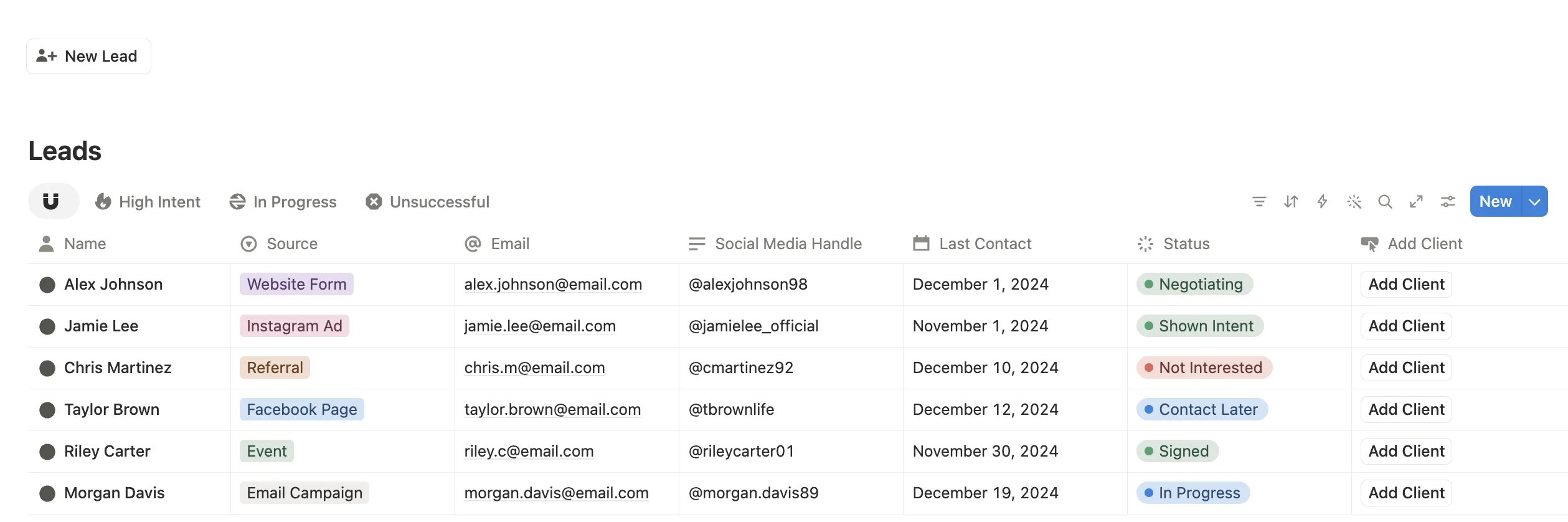
To convert more leads, keep track of what matters to each potential client. A simple (or advanced) lead tracker in Notion can store:
When you last contacted them
Their social media handles
Their main goals, so you can tailor your messages and coaching packages
This way, no potential client gets left on delivered or slips through the cracks.
How to set up a lead tracker in Notion
Create a leads database with these properties:
Name and social handles
Status: new, contacted, call booked, client, not interested
Source: Instagram, referral, website, word of mouth
Main goal
Last contacted and next follow-up (date properties)
Notes for anything they've told you
Then add two views:
A board view grouped by status, so you can see your whole pipeline and drag leads along as they move forward
A table view filtered to show leads whose next follow-up is today or earlier, so you know exactly who to message each day
Over time, the source property shows which channels bring in the leads that actually become clients.
Step 3: Onboard new clients smoothly
Notion has plenty of tools to help with onboarding. Its built-in forms are available on the free plan, so you can create forms and send them to every new client.
You can also create as many custom forms and documents as you need, such as a PAR-Q or a lifestyle assessment.
Everything stays organized in a database, and you can link each assessment to the client's portal or name, so their details are always in one place.
What to include in your onboarding pack
A good onboarding process gives new clients a clear start and gives you everything you need to coach them well. Consider including:
A welcome page explaining how your coaching works and how to contact you
A PAR-Q
A goals and lifestyle assessment (sleep, stress, work schedule, nutrition habits)
Training availability and access to equipment
Starting measurements and progress photos, if the client is comfortable sharing them
Your check-in schedule and what you'll ask each time
Use templates to onboard faster
In your client database, create a page template that already contains your welcome page and onboarding forms. Each time you add a new client, apply the template and their onboarding pack is ready in one click.
Step 4: Set targets and track your business results
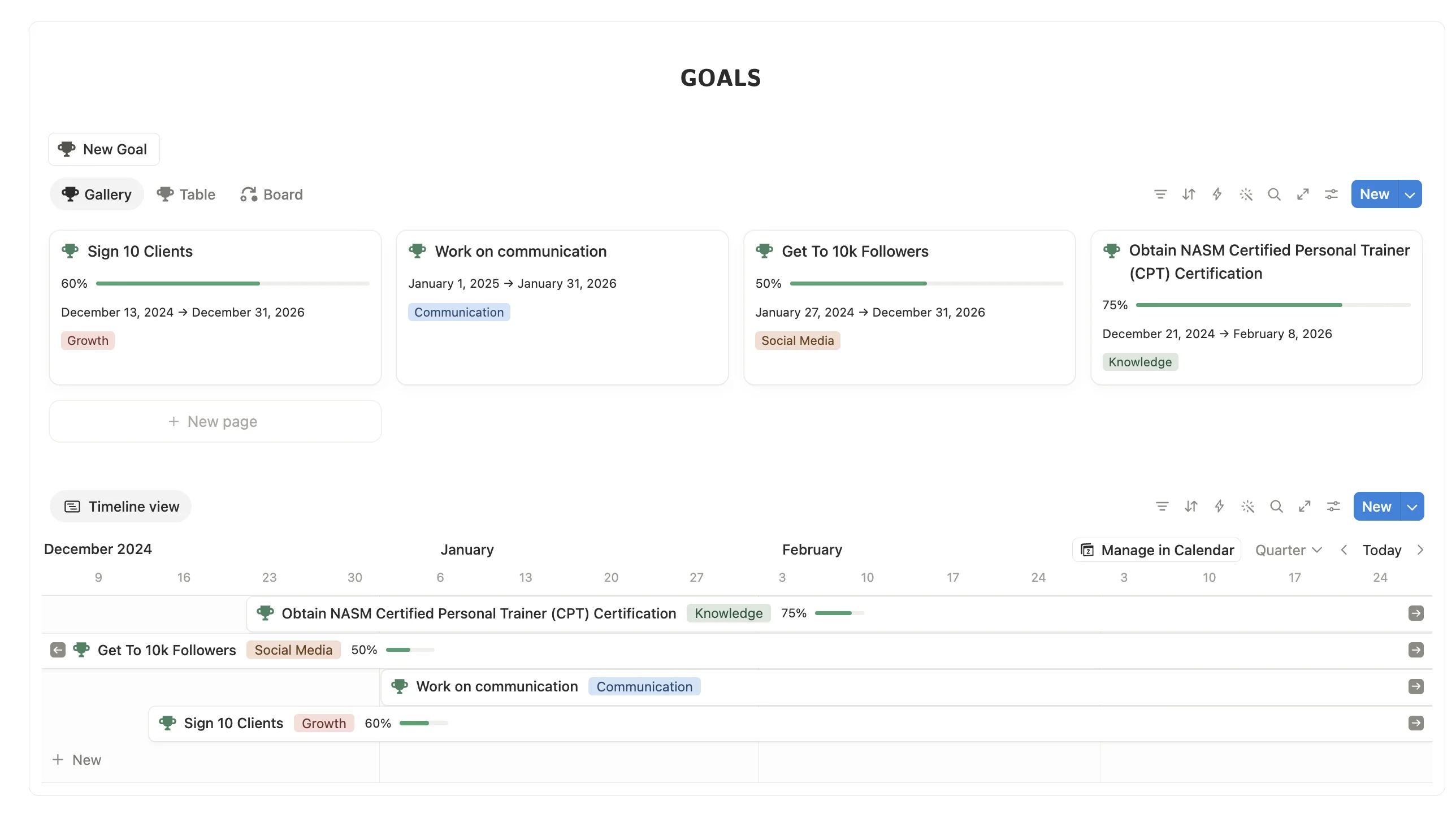
You wouldn't coach a client without tracking their progress, and your business works the same way. Targets give you something to aim for, and tracking your results shows you what's working so you can do more of it.
Set clear targets
Pick a few targets that reflect how your business grows, such as:
New leads per month
New clients per month
Monthly revenue
Client retention (how many clients stay on each month)
Make each target specific and give it a time frame, so you can tell whether you hit it.
Track your results in Notion

Create a monthly review database with a page for each month. Add number properties for each target and your actual result, plus a formula property that shows your progress as a percentage. A chart view can then show how each number changes over time.
At the end of each month, note what worked, what didn't, and what you'll change next month. If you link your reviews to your lead tracker and content database, you can see which posts, messages and referral sources actually brought in clients.
See your business at a glance
A stats dashboard shows where your business stands right now, without digging through databases. Useful numbers to keep at the top of your workspace:
Clients: how many people you're currently coaching
Active leads: potential clients you're in conversation with
Leads not contacted: new leads still waiting for a first message
Sessions booked this month: how busy your calendar is
Income: what you've earned this month
Total audience: your reach across your channels
Together, these show whether your pipeline is healthy and where to focus next. A growing number of leads not contacted, for example, is a sign to block out time for follow-ups.

FAQ
Is Notion free for personal trainers?
Notion has a free plan that includes databases and forms, so you can build everything in this guide without paying. Paid plans add extra features, but you don't need them to get started. See how it compares to subscription coaching apps.
Can I manage my clients and my business in the same Notion workspace?
Yes. Your client database, lead tracker, content planner and monthly reviews can all live in one workspace and be linked together.
Can I coach and track clients in Notion?
Yes. You can give each client their own page and use databases to track their progress, such as weight, strength, habits, diet and body measurements. PRO COACH includes pre-built client tracking for habits, diet, strength, weight, body measurements, range of motion, cardio and custom metrics. PRO COACH also lets you build full client fitness plans and meal plans that clients can access, like a traditional coaching app.
Does Notion work on my phone?
Yes. Notion has apps for iOS and Android, so you can update your trackers between sessions.
Do I need PRO COACH to do this?
No. You can build everything in this guide yourself in Notion. PRO COACH gives you a pre-built system, so you can skip the setup and start using it straight away.
Get it all pre-built with PRO COACH
If you want a fully pre-built Notion system that does all of the above and more, check out PRO COACH. It's a one-time purchase with no subscriptions.
200+ movements
Business manager
Progress tracking
Fully customizable
Client portals
Diet & fitness coaching
No monthly fees
Bonus growth toolkit
Used by 1,700+ coaches
Email support
Running and growing a personal training business, online or in person, can be tough. You're not only finding clients, you're also making sure they're happy and getting results, usually on your own.
With so many moving parts, it helps to have one system where you can manage and track every area of your business.
Below, I'll explain how to manage and grow your personal training business using Notion, an app with a free plan that you can use to organize just about anything.
The three areas of a personal training business
Personal training is made up of three main areas: clients, coaching, and business. Each one needs a different skill set, but that doesn't mean you have to manage them separately.
This guide covers the business side: growing your client base and keeping the clients you have.
If you're like me, you find it useful to have a concrete plan for your business. You know what to do, what works, and which areas need improvement, just like with coaching.
To get there, you need:
A system to acquire leads (potential clients)
A way to track leads so you convert more of them
An onboarding process so you know exactly what each client wants
A way to set targets and track your business results
That's where Notion comes in. This guide walks you through each area and how to manage it in Notion.
Step 1: Acquire more leads
Getting new clients is a different skill from coaching, and it's not what you spent all that time training for. If your business relies on new clients, it's worth having a system that makes lead generation as easy as possible.
Plan your social media content
Depending on the age of your target clients, platforms like Instagram and Facebook are where you'll find many of the clients who don't come from word of mouth or referrals.
Posting content regularly is one of the habits worth getting good at if you want new clients from social media. A social media planning dashboard makes it much easier. You can organize your images and videos, plan when to post, and track the engagement on each post.
Over time, you'll see what resonates with your target clients. Then you can double down on what works and try new ideas where it doesn't.
There's a real science to creating content that not only resonates but also gets people to DM you or buy your package. Tracking your posts is how you figure it out.
In Notion, you can set this up as a content database with a timeline view, so you can schedule posts and keep a consistent posting frequency.
A simple setup looks like this:
Properties: post title, platform, format (reel, carousel, story), post date, status (idea, drafting, scheduled, posted), and number properties for views, comments and DMs
Views: a timeline or calendar view to plan your schedule, and a table sorted by engagement so your best posts rise to the top
Build a recognizable brand
On social media, it pays to have your own brand or vibe. In Notion, you can keep your brand colors, phrases, images, logos, and more in one place, so every post looks like yours. When someone sees your post on the Explore page, they'll know it's you.
A clear brand also helps you niche down, so you can speak directly to the clients you want to work with.
Track growth strategies beyond social media
Social media isn't the only way to grow your business. In Notion, you can lay out different growth strategies, track which ones work, and adjust as you go.
For example, you could create a database to track a client referral program. You'll see which clients have referred new clients, so you can thank or reward them and see how much of your growth comes from referrals.
To set it up, create a referrals database with properties for the new client, who referred them (a relation to your client database), the date, and a checkbox for whether you've sent a thank-you or reward.
Plan and track your outreach messages
Like your social posts, tracking the DMs and messages you send to potential clients shows you what works. Once you know which opening line gets the most replies, or which call to action converts best, you can tailor your messaging to turn more leads into clients.
In Notion, create a database of your message templates. Give each one properties for the opening line, the call to action, how many times you've sent it, and how many replies it got. A formula property can then calculate the reply rate, so you can see at a glance which messages to keep using.
Use the value equation in your marketing
One marketing idea I love is Alex Hormozi's value equation, from his book $100M Offers. It says the value of your offer comes down to four things:
If you haven’t come across the value equation before, this short video explains it well.
To make your offer more valuable, increase the top half and reduce the bottom half:
Dream outcome: what your client really wants, such as feeling confident at the beach, not just "losing weight"
Perceived likelihood of achievement: proof you can get them there, such as client transformations and testimonials
Time delay: how soon they'll see progress, such as a clear plan for their first few weeks
Effort and sacrifice: how easy you make it, such as flexible meal plans instead of strict diets
For example, instead of an ad that says "Online coaching available," you could write: "Feel confident in your body with a plan built around your schedule, regular check-ins, and real client results to show it works." That one line speaks to all four parts of the equation.
Capture leads with forms
PRO COACH users use Notion forms to collect new leads and quickly understand each person's goals and availability.
A lead form keeps every inquiry in one place and gives you what you need before your first conversation. Useful questions to include:
Name and contact details
Main goal
Training experience
Availability
Online or in-person coaching
How they heard about you
Each response is saved as a new entry in a Notion database, so it can feed straight into your lead tracker. The "how they heard about you" answer also shows you which growth strategies are bringing in leads.
Here’s an example of a basic lead form. You can build any type of form, with text fields, checkboxes, file uploads and more.
Step 2: Track and convert your leads
To convert more leads, keep track of what matters to each potential client. A simple (or advanced) lead tracker in Notion can store:
When you last contacted them
Their social media handles
Their main goals, so you can tailor your messages and coaching packages
This way, no potential client gets left on delivered or slips through the cracks.
How to set up a lead tracker in Notion
Create a leads database with these properties:
Name and social handles
Status: new, contacted, call booked, client, not interested
Source: Instagram, referral, website, word of mouth
Main goal
Last contacted and next follow-up (date properties)
Notes for anything they've told you
Then add two views:
A board view grouped by status, so you can see your whole pipeline and drag leads along as they move forward
A table view filtered to show leads whose next follow-up is today or earlier, so you know exactly who to message each day
Over time, the source property shows which channels bring in the leads that actually become clients.
Step 3: Onboard new clients smoothly
Notion has plenty of tools to help with onboarding. Its built-in forms are available on the free plan, so you can create forms and send them to every new client.
You can also create as many custom forms and documents as you need, such as a PAR-Q or a lifestyle assessment.
Everything stays organized in a database, and you can link each assessment to the client's portal or name, so their details are always in one place.
What to include in your onboarding pack
A good onboarding process gives new clients a clear start and gives you everything you need to coach them well. Consider including:
A welcome page explaining how your coaching works and how to contact you
A PAR-Q
A goals and lifestyle assessment (sleep, stress, work schedule, nutrition habits)
Training availability and access to equipment
Starting measurements and progress photos, if the client is comfortable sharing them
Your check-in schedule and what you'll ask each time
Use templates to onboard faster
In your client database, create a page template that already contains your welcome page and onboarding forms. Each time you add a new client, apply the template and their onboarding pack is ready in one click.
Step 4: Set targets and track your business results
You wouldn't coach a client without tracking their progress, and your business works the same way. Targets give you something to aim for, and tracking your results shows you what's working so you can do more of it.
Set clear targets
Pick a few targets that reflect how your business grows, such as:
New leads per month
New clients per month
Monthly revenue
Client retention (how many clients stay on each month)
Make each target specific and give it a time frame, so you can tell whether you hit it.
Track your results in Notion
Create a monthly review database with a page for each month. Add number properties for each target and your actual result, plus a formula property that shows your progress as a percentage. A chart view can then show how each number changes over time.
At the end of each month, note what worked, what didn't, and what you'll change next month. If you link your reviews to your lead tracker and content database, you can see which posts, messages and referral sources actually brought in clients.
See your business at a glance
A stats dashboard shows where your business stands right now, without digging through databases. Useful numbers to keep at the top of your workspace:
Clients: how many people you're currently coaching
Active leads: potential clients you're in conversation with
Leads not contacted: new leads still waiting for a first message
Sessions booked this month: how busy your calendar is
Income: what you've earned this month
Total audience: your reach across your channels
Together, these show whether your pipeline is healthy and where to focus next. A growing number of leads not contacted, for example, is a sign to block out time for follow-ups.
FAQ
Is Notion free for personal trainers?
Notion has a free plan that includes databases and forms, so you can build everything in this guide without paying. Paid plans add extra features, but you don't need them to get started. See how it compares to subscription coaching apps.
Can I manage my clients and my business in the same Notion workspace?
Yes. Your client database, lead tracker, content planner and monthly reviews can all live in one workspace and be linked together.
Can I coach and track clients in Notion?
Yes. You can give each client their own page and use databases to track their progress, such as weight, strength, habits, diet and body measurements. PRO COACH includes pre-built client tracking for habits, diet, strength, weight, body measurements, range of motion, cardio and custom metrics. PRO COACH also lets you build full client fitness plans and meal plans that clients can access, like a traditional coaching app.
Does Notion work on my phone?
Yes. Notion has apps for iOS and Android, so you can update your trackers between sessions.
Do I need PRO COACH to do this?
No. You can build everything in this guide yourself in Notion. PRO COACH gives you a pre-built system, so you can skip the setup and start using it straight away.
Get it all pre-built with PRO COACH
If you want a fully pre-built Notion system that does all of the above and more, check out PRO COACH. It's a one-time purchase with no subscriptions.
200+ movements
Business manager
Progress tracking
Fully customizable
Client portals
Diet & fitness coaching
No monthly fees
Bonus growth toolkit
Used by 1,700+ coaches
Email support